Is AI making designers obsolete?
Why a human designer still has a place at the table
A few weeks ago, Google dropped the DESIGN.md feature inside Stitch, an agent-friendly markdown file that lets anyone on the product team export or import design rules to or from other design and coding tools. Basically, it means product managers, developers, stakeholders — they can all whip up a UI screen from a prompt now. The barrier to producing something that looks like a design has never been lower.
But here’s the thing: those screens live in a vacuum. No design system. No user flow. No context. You still need a designer to turn that raw output into something that actually fits your product.
That’s where Figma comes back in. Last week, they dropped Skills – AI agents that can work directly on our Figma canvas. Not just generating ideas, but actually building. Creating components, applying variables, using our real design system (living in Figma) like they’ve been on our team for years. Basically, Figma skills are simple markdown files that teach the AI agents we use (Claude Code and CoPilot) how our team thinks and works. We write it once, and suddenly it applies everywhere. No code, no fuss.
Both announcements landed in the same week. Both betting on markdown as the bridge between design systems and AI. That’s not a coincidence. That’s a direction.
Which makes me wonder: At what point do I stop designing screens?
The gap between “designed” and “built” is shrinking fast. The kind of screens we’ve all made a hundred times — settings pages, lists, forms — can now be spun up by an agent from a simple prompt. As code, or straight into Figma, ready to review.
But here’s the thing: the AI has no idea why any of it should exist. It doesn’t know users are dropping off during onboarding. It doesn’t feel the friction in a flow. It doesn’t know that one feature needs to work for both power users and first-timers. That’s still us. That’s UX. And that part just became more important, not less. Think spectrum: On one end: new problems, weird flows, things that don’t exist yet. That’s still very much design work. On the other: dashboards, CRUD, standard flows. That’s where agents shine.
So our role as a design team is shifting — from designing every single screen to defining the experience and judging what comes out. And honestly, I’ve been waiting for this quite some time. Right now, we spend way too much time polishing screens that shouldn’t need polishing anymore. It’s hard to feel truly “on top” of the design when so much of it is production work. I can easily see that dropping in our design team — from designing 100% of screens to maybe 30–40% in the next couple of years. The rest gets generated, reviewed, refined. That’s not a loss. That’s leverage.
So why not just skip the IDE entirely?
The dream for us designers is tempting: design screens in Figma using our design system, push code straight to GitHub, never open an IDE. And parts of that pipeline exist today. Figma Make can push a project to a repo. We can import our libraries so generated screens respect our brand. And Code Connect maps our Figma components to our actual codebase.
But it falls apart fast. Make pushes are one-way — the moment a developer touches the code, Make loses track. No branches, no PRs, no merge. And Make generates standalone apps, not components inside our existing project. It doesn’t know our routing, our state management, our API layer.
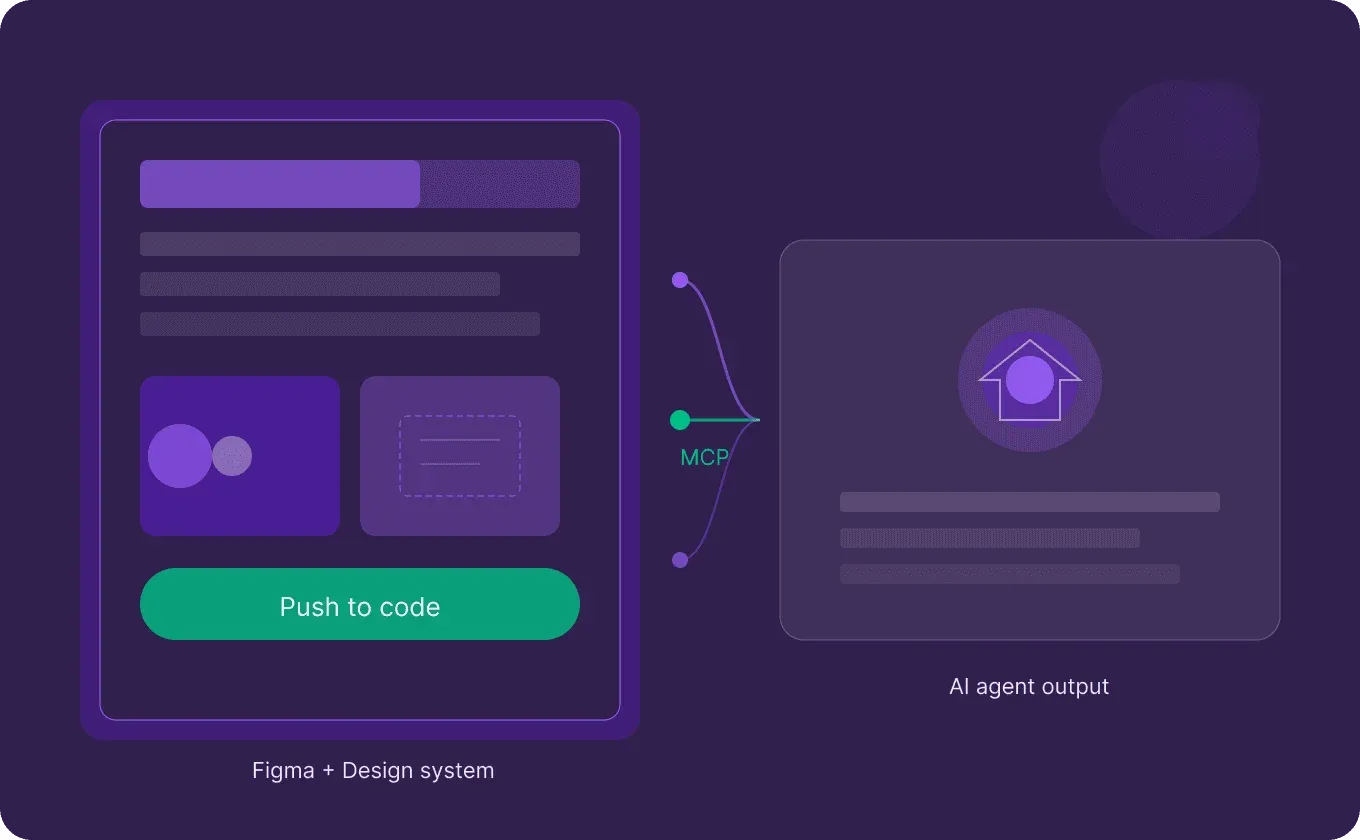
The workflow that actually works right now is: design in Figma with our system, connect via MCP to Claude Code or Cursor, and let the AI agent generate code that uses our real components inside our real codebase. Copilot even lets us send rendered UI back to Figma for review — a proper round-trip.
Figma Make? Best used as a vibe-coding scratchpad. Great for validating flows and testing ideas with stakeholders. But when it proves the concept, we design it properly in Figma and use the MCP pipeline for production code.
The real risk nobody’s talking about.
None of this works if your design system is a mess. Every agent — whether it’s Claude Code reading your Figma via MCP, or a Skill assembling screens from your component library — is only as good as the system it draws from. Vague token names? The agent guesses. Inconsistent component structure? The output is inconsistent. Missing documentation? The AI fills in the gaps with generic assumptions, and suddenly your carefully crafted product looks like a template from 2019.
We’ve already seen this on our own projects. When the system is tight — clean naming, well-structured variants, tokens that map logically to the codebase — the agent output is surprisingly close to what we’d design ourselves. When it’s not, we spend more time fixing the generated screens than it would’ve taken to design them from scratch. Which defeats the whole point.
So part of the design team’s job is evolving into something that feels less glamorous but matters more than ever: curating the design system. Making sure every component is named in a way both humans and machines understand. Keeping token structures clean. Documenting patterns so that when an agent asks “how does this team handle empty states?” there’s an actual answer.
The teams who’ve invested in this will fly. The ones who haven’t will wonder why AI keeps producing junk. In the end, a designer’s value is shifting from production to judgment. From pushing pixels to shaping the system that shapes the output. Knowing what good looks like — and catching what AI gets wrong.
That’s not less design. That’s more design with less busywork.
#FigmaAI #DesignSystems #MCP #UXDesign #ProductDesign